Front What are the two repeating stages of normal sleep?
Flip the card
Back Non-REM sleep and REM sleep.
In the app you type (or dictate) your answer first; the AI grades it against this reference and explains the difference.
PDF to flashcards
Import a PDF, pick the pages or the chapter you need, and PupilBot writes the flashcards for you. You answer in your own words; the AI grades it, and spaced repetition brings each card back before you forget it.
Make flashcards from a PDF — free See how it works
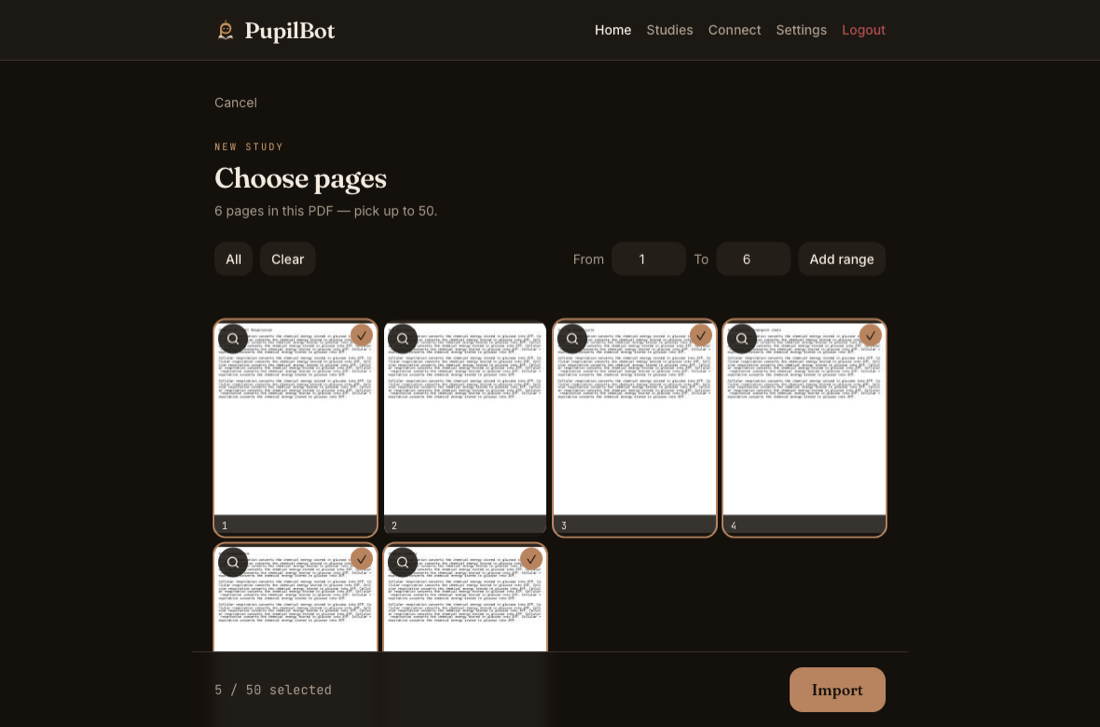
On the capture screen choose “Load a PDF”. Pick pages one at a time, a page range, or a whole chapter from the PDF's table of contents. Up to 50 pages go into one study. Your first study is free, up to 3 pages. Premium: up to 50 pages per study. 5 study uploads per day · 50 per month.
Pages that carry a real text layer are read straight off the file; scanned pages go through OCR. The AI finds the topics on your pages and writes a card for each thing worth remembering — usually in about a minute.
Type or dictate your answer. The AI grades it against the reference and explains what you missed. Cards you know move far out; cards you miss come back soon.
The study below starts from a short text about sleep and memory. The excerpt is the source; the flash cards are what a study built from it looks like.
This is the demo study every new PupilBot account starts with: a short text, and the flash cards and questions built from it — the same shapes the generator produces for your own pages.
Sleep is not just a period of rest. While you sleep, the brain continues to process information from the day. It strengthens useful connections, organizes new memories, and makes some information easier to recall later.
Front What are the two repeating stages of normal sleep?
Back Non-REM sleep and REM sleep.
In the app you type (or dictate) your answer first; the AI grades it against this reference and explains the difference.
Front How can sleeping after you learn something help your memory?
Back It helps stabilize and strengthen new memories so they are easier to recall later.
In the app you type (or dictate) your answer first; the AI grades it against this reference and explains the difference.
Front Name two habits that make it easier to wind down before bed.
Back Dimming the lights and following a quiet, consistent routine.
In the app you type (or dictate) your answer first; the AI grades it against this reference and explains the difference.
A study mixes flash cards with single- and multiple-choice, fill-in-the-blank and numeric questions, chosen per topic — so one PDF becomes both a deck and a quiz.
No. PupilBot writes them from the pages you picked. If a card is wrong or unclear you can flag it, and you can regenerate a study for a fresh set.
No. You type your answer and the AI grades it against the reference answer, then explains the gap. There is no “I got it right” button to fool yourself with.
Yes. Pages without a text layer go through OCR, the same as a photo. Straight, well-lit scans read best.
Up to 50 pages per study. For a long book, make one study per chapter — that also keeps your mastery scores per chapter. Your first study is free, up to 3 pages. Premium: up to 50 pages per study. 5 study uploads per day · 50 per month.
By default the cards are written in the language you use the app in. Turn on “Generate questions in the study's language” when you import the PDF to keep the PDF's own language instead. The app is available in English, Spanish, French, German, Italian and Romanian.
PupilBot is free to start. A paid subscription unlocks more usage; the web app, the iPhone app and the Telegram bot all use the same account. Your first study is free, up to 3 pages. Premium: up to 50 pages per study. 5 study uploads per day · 50 per month.